How to pass the financing cost on to your customer
Last updated: June 12, 2026
When a customer pays in installments, there's a financing cost. You can decide, per installment tier, whether you (as the merchant) absorb that cost or pass it on to your customer.
This article explains how the feature works, where it's available, how to configure it from the dashboard or via API, and how the customer price is calculated when the cost is passed through.
How it works
For every number of installments you offer (3, 6, 9, 12, 18, 24), you choose who pays the financing cost:
You (the merchant) absorb it — the customer pays the same total as a single payment ("Sin interés" / "Interest-free"). Your net is reduced by the financing fee.
The customer absorbs it — the customer pays a higher total. The price is grossed up so your net stays the same as a single payment.
Default behavior: by default, your account is set so that you (the merchant) absorb the financing cost on every installment tier. Customers always see "Sin interés", and your net is reduced according to the financing fee on each tier.
You can change this default in Settings → Installment Financing, per currency and per tier, and you can override it on any individual payment link before publishing — either from the dashboard or via API.
The same configuration applies to checkouts integrated via the Rebill SDK (1.17.22 or higher).
Where it's available
This configurable model is available in countries where the merchant is the one absorbing the financing cost by default:
Mexico (MXN)
Argentina (ARS)
Brazil (BRL)
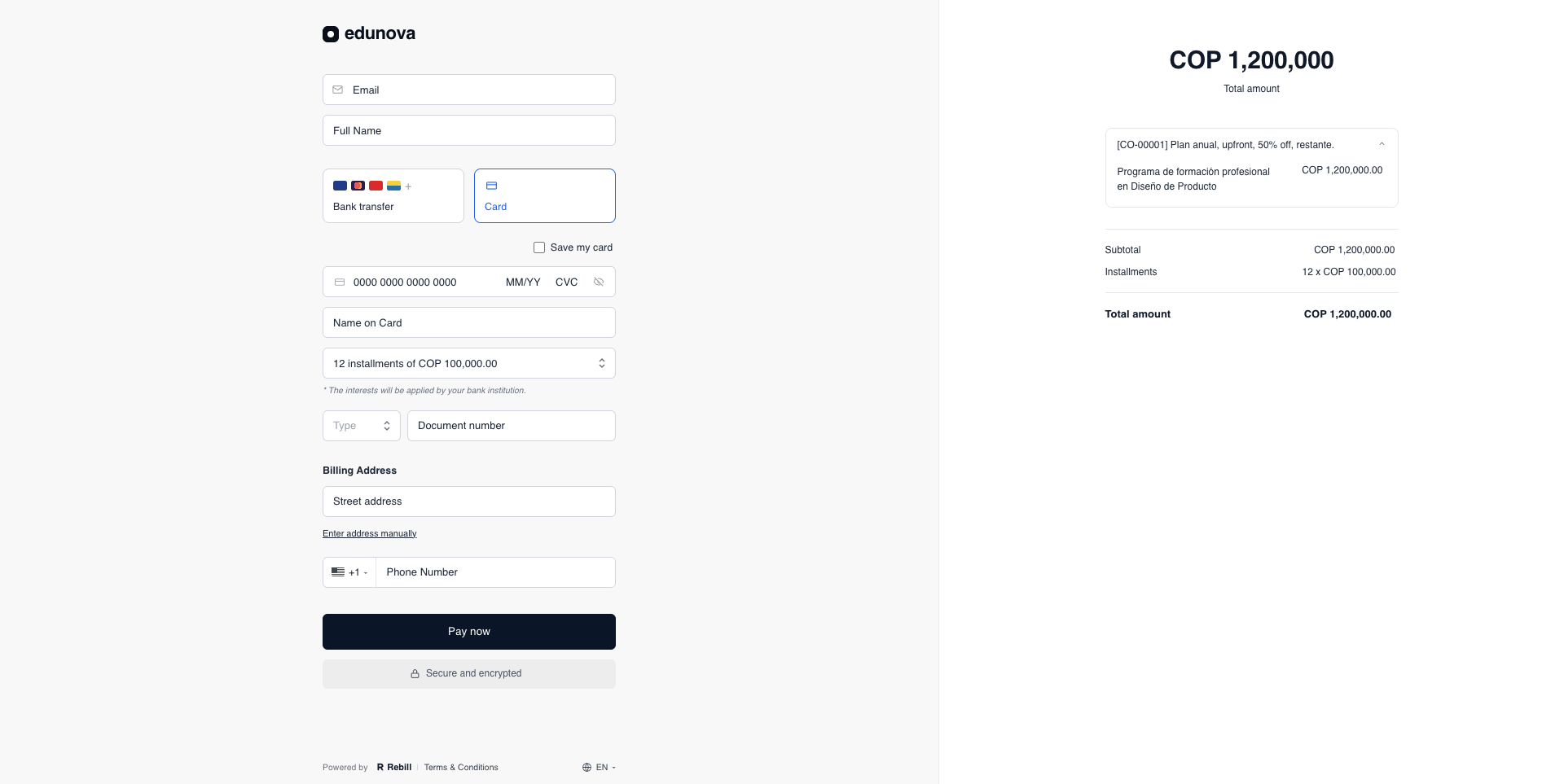
In Colombia (COP) and Chile (CLP), the interest on installments is defined entirely by the customer's card issuer and varies by issuer and card tier. Because the rate lives with the issuer, there's nothing to configure for these countries from your dashboard. The checkout shows a disclaimer to the customer letting them know that the interest will be calculated by their bank.
Configuring it from the dashboard
When you create or edit a payment link from the dashboard, expand the Installments section of the form. For each country / currency you have enabled, you'll see a table with one row per installment tier:
Column | Meaning |
|---|---|
Installments | Number of installments (1, 3, 6, 9, 12, 18, 24). |
Customer pays | The total the customer will be charged on this tier. Updates live based on your selections. |
How much you get | The amount you receive on this tier, before Rebill's processing and FX fees and any applicable taxes. (The footnote in the UI confirms this — those costs are still yours, not the customer's.) |
Financed by | Choose Merchant (you absorb the financing cost) or Customer (the customer absorbs it). |
Use the checkbox on the left of each row to enable or disable that tier on the payment link. The 1-installment row has no "Financed by" option, since a single payment has no financing cost.
The configuration applies only to this payment link and overrides the account-level default. The Checkout preview panel on the right shows the customer-facing result, so you can validate the amounts before publishing.
Configuring it via API
If you create payment links through the Rebill API, you can configure who absorbs the financing cost directly in the POST /v3/payment-links request. Two fields control the behavior:
installmentsSettings— defines which installment tiers are offered for each currency.responsibilitySettings.byPaymentMethod.card.fees.financing.{CURRENCY}— lists the tiers where the customer absorbs the financing cost. Any tier you don't list here stays absorbed by the merchant (the default).
Example — offer 1, 3, 6, 9 and 12 installments in MXN. The merchant absorbs the cost on 1 and 3 installments; the customer absorbs it on 6, 9 and 12:
curl --location 'https://api.rebill.com/v3/payment-links' \  --header 'x-api-key: [API_KEY]' \  --header 'Content-Type: application/json' \  --data '{
    "title": [{"text": "Annual Pass", "language": "es"}],
    "paymentMethods": [{"methods": ["card"], "currency": "MXN"}],
    "prices": [{"amount": 1000, "currency": "MXN", "isDefault": true}],
    "installmentsSettings": [
      {"currency": "MXN", "enabledInstallments": [1, 3, 6, 9, 12]}
    ],
    "responsibilitySettings": {
      "byPaymentMethod": {
        "card": {
          "fees": {
            "financing": {
              "MXN": [
                {"installments": 6,  "absorbedBy": "CUSTOMER"},
                {"installments": 9,  "absorbedBy": "CUSTOMER"},
                {"installments": 12, "absorbedBy": "CUSTOMER"}
              ]
            }
          }
        }
      }
    }
  }'
Key rules:
If a tier appears in
enabledInstallmentsbut is not listed inresponsibilitySettings, the merchant absorbs the cost on that tier.If you don't send
responsibilitySettingsat all, the merchant absorbs the cost on every tier — same as the account-level default.Integrations created before this feature continue to work as before, with the merchant absorbing the cost on every tier.
How the customer price is calculated
When the customer absorbs the financing cost, the price they pay is "grossed up" slightly above the raw financing fee. This is because Rebill's fees are calculated on the final amount the customer pays — not on the base price. Without the gross-up, the additional fees on the inflated amount would reduce your net.
The formula keeps your net identical to a single payment on every tier:
Price increase % = financing fee / (1 − (Rebill fees + financing fee))Rebill fees in the formula above is the sum of every fee Rebill applies to that payment:
Processing fee — applies to every payment, local or cross-border.
FX fee — only applies to cross-border payments, when the customer's card is issued in a different currency than the one you charge in. For local payments, this term is zero.
Worked example — local payment
The numbers below are reference values used to illustrate the formula. They are not Rebill's actual fees.
Base price: 60,000 MXN. The customer chooses 12 installments and pays with a local card, so only the processing fee applies.
Processing fee: 3%
Financing fee for 12 installments: 12%
Sum: 15%
Price increase: 12% / (1 − 15%) = 14.12%
Customer price: 60,000 × 1.1412 = 68,471 MXN → 12 × 5,706 MXN
Your net after fees: 58,200 MXN — the same as a single payment
For a cross-border payment, the FX fee is added to the sum in the denominator. The formula and the logic are the same; the customer price ends up slightly higher because there is one more fee to gross up against.
The same logic applies to every tier. The more installments the customer chooses, the higher the financing fee and the higher the grossed-up total they pay, while your net stays flat.
What gets passed to the customer
The customer absorbs the financing fee, plus the small additional processing / FX cost that the higher price generates. The processing and FX fees on the base price are still paid by you, exactly as on a single payment — they are not passed to the customer. The gross-up only shields you from the extra fees the inflated price would otherwise create. This is why the "How much you get" column in the dashboard shows the amount before processing, FX and taxes: those costs always remain on your side.
How the payment appears in your dashboard
When the customer chooses a tier where they absorb the financing cost, the payment in your dashboard shows the grossed-up amount actually charged, not the base price.
Using the example above: if the customer picks 12 installments and pays 68,471 MXN, the payment in your dashboard appears as 68,471 MXN. After Rebill's fees, your net is 58,200 MXN — the same net you would have received on a single payment of 60,000 MXN.
Keep this in mind if your internal systems reconcile against the base price. You may want to track the base price separately on your side.
Need help?
If you have questions about installment financing or need help configuring it, please contact us at support@rebill.com.